How Does a Drone Gimbal Work? Axes, Stabilization, Modes and Setup
What is a drone gimbal? It is a motorized camera mount that keeps the view steady as the drone tilts and turns. How does a drone gimbal work, and how do you set one up for aerial photography, mapping and inspection?
What a drone gimbal is
A drone gimbal is a pivoting mount between the drone camera and the drone frame. Instead of holding the camera rigidly in place, it allows the camera to rotate independently of the aircraft. Motors make controlled movements to keep the camera at the desired angle.
Imagine filming a landscape as a drone moves forward. The aircraft needs to tilt, but you want the camera to keep looking at the scenery rather than the ground. A stabilized gimbal can correct for that tilt.
A gimbal on a drone is useful for more than smooth video. Aerial photo drones use gimbals to keep horizons level, survey drones use them to maintain a camera angle for mapping, and inspection drones use them to frame equipment being examined.
A drone can fly without a camera gimbal. The gimbal stabilizes the camera, not the aircraft itself.
The three axes: pitch, roll and yaw
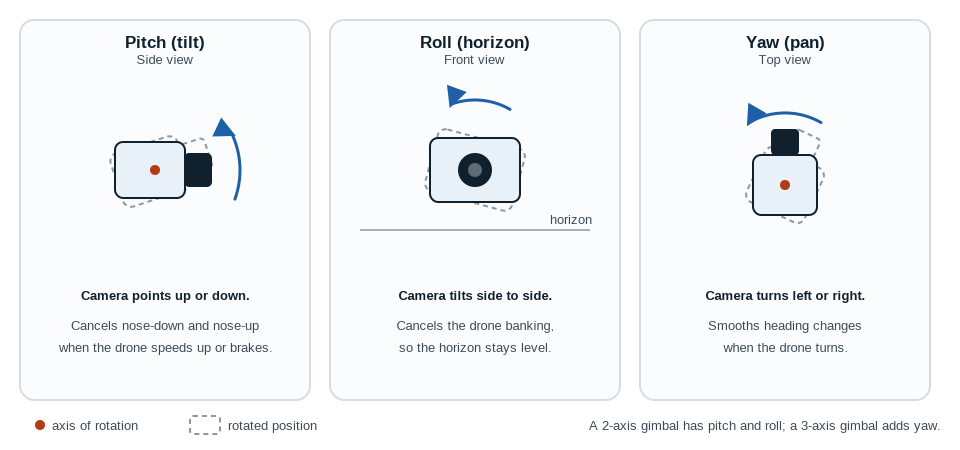
A 3-axis gimbal can stabilize the camera around the following axes. Each axis describes a rotation, not movement along a straight line.
- Pitch (tilt). The camera points up or down. Pitch stabilization counteracts the nose-down motion when the drone accelerates forward and the nose-up motion when it brakes. You can tilt the camera down for an overhead photo without having to tilt the entire aircraft.
- Roll (horizon). The camera rotates from side to side around its viewing direction. Roll stabilization counteracts the banking or sideways tilt of the drone. It keeps the horizon from leaning to the left or right in the image.
- Yaw (pan). The camera turns left or right horizontally. Yaw stabilization helps smooth the changes in camera direction when the aircraft turns.
The difference between pitch and yaw is easy to see in a landscape shot. Tilting the camera changes how much sky or ground appears in the frame. Panning the camera changes which part of the landscape appears in the frame. The same three axes describe how the aircraft itself moves; see how drones work.
How stabilization works
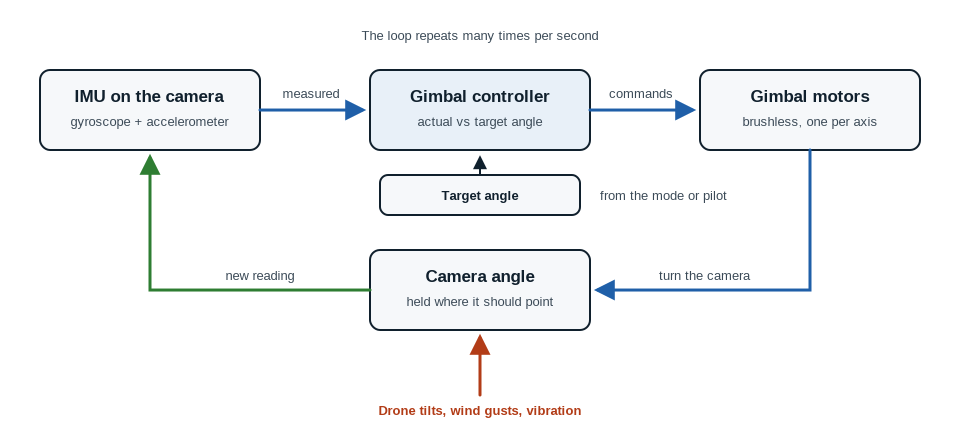
A motorized gimbal uses sensors, a controller and brushless gimbal motors to stabilize the camera. They work together in a closed loop, which means the system checks the result of each correction and uses it to make the next correction.
Step 1. Detect camera motion. An inertial measurement unit, or IMU, contains a gyroscope and an accelerometer. The gyroscope senses rotation, and the accelerometer measures acceleration and helps establish the direction of gravity.
Step 2. Compare the actual and desired angles. The gimbal controller uses sensor readings to estimate the camera's orientation. It compares that orientation with the angle the camera should hold. The difference is the error that the controller needs to correct.
Step 3. Move the camera. The controller sends commands to the brushless motors. They rotate the camera to reduce the error. Direct-drive gimbal motors do not need a gearbox to make these small movements.
Step 4. Check the result. The IMU measures the camera's motion again. The controller continues to make corrections based on this feedback.
The gimbal controller and the drone flight controller have different jobs. The gimbal controller stabilizes the camera, while the flight controller handles the aircraft's movement. Common gimbal control interfaces include PWM, S.BUS, MAVLink and serial interfaces.
Vibration dampers
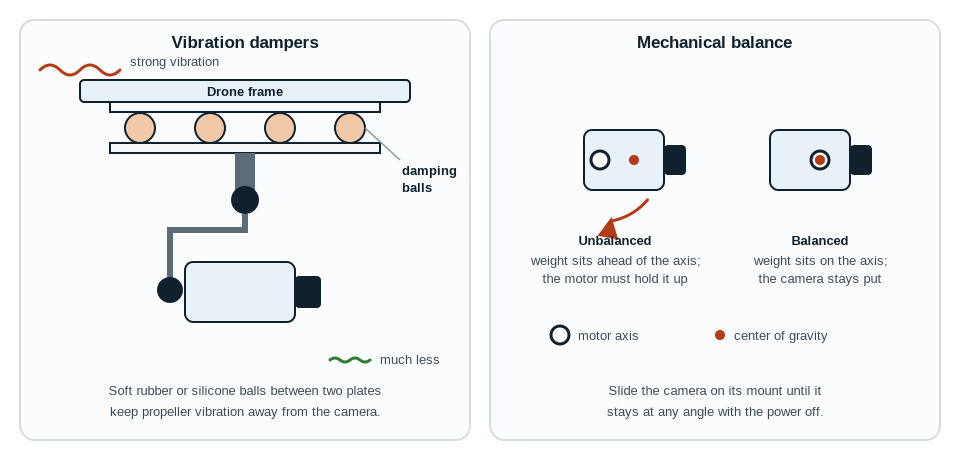
The drone motors and propellers generate small, rapid vibrations during flight. A gimbal's active stabilization cannot remove every vibration on its own.
Many gimbal mounts have rubber or silicone damping balls between an upper plate attached to the drone and a lower plate carrying the gimbal. These flexible parts reduce the vibration transmitted to the camera. This is passive damping; it works mechanically without motor commands.
Without effective vibration isolation, fine vibration can cause the jello effect, a wavy distortion in footage from a rolling-shutter camera. Damper stiffness needs to suit the weight of the gimbal and camera. Dampers that are too soft can sag or bounce, while those that are too stiff transmit more vibration.
Mechanical balance and vibration isolation are not the same thing. Balance reduces the load on the gimbal motors. Dampers reduce the vibration reaching the gimbal from the airframe.
2-axis vs 3-axis gimbal
The main difference between a 2-axis and 3-axis gimbal is independent yaw stabilization. A typical 2-axis drone gimbal stabilizes pitch and roll but has no yaw motor.
| Item | 2-axis gimbal | 3-axis gimbal |
|---|---|---|
| Stabilized axes | Pitch and roll | Pitch, roll and yaw |
| Horizon stability | Corrects banking | Corrects banking |
| When the drone turns | View follows the aircraft's heading | Yaw motion is smoothed |
| Weight | Usually lighter | Usually heavier |
| Power use | Generally lower | Generally higher |
| Mechanical design | Simpler | More complex |
The difference is noticeable when a drone changes direction. A 2-axis gimbal can keep the horizon level even though the view moves sideways as the aircraft turns. A 3-axis gimbal also corrects changes in yaw, giving the camera a smoother pan. The Caddx GM3 V2, for example, is a compact three-axis gimbal for FPV camera integration that weighs 56 g.
Mechanical gimbal vs electronic image stabilization
Electronic image stabilization, or EIS, is another way to reduce shaky video. It changes the image rather than physically moving the camera. Software uses part of the captured image as a moving output window and adjusts the frame to compensate for motion.
| Item | Mechanical gimbal | Electronic image stabilization |
|---|---|---|
| How it works | Physically rotates the camera | Digitally crops and adjusts the image |
| Field of view | No digital crop required for mechanical stabilization | Often narrower because of cropping |
| Low-light footage | Reduces camera movement during exposure | Cannot fully correct motion blur already captured |
| Large tilts | Corrects camera angle within its range | Limited by the available image area |
| Size and weight | Requires a moving mount and motors | No separate mechanical mount required |
Some compact camera drones combine mechanical and electronic stabilization. The two methods can work together. A moving camera mount reduces physical motion, while EIS smooths the resulting image further.
Sourcing camera gimbals for your business? Ask our team.
Gimbal modes: follow, lock and FPV
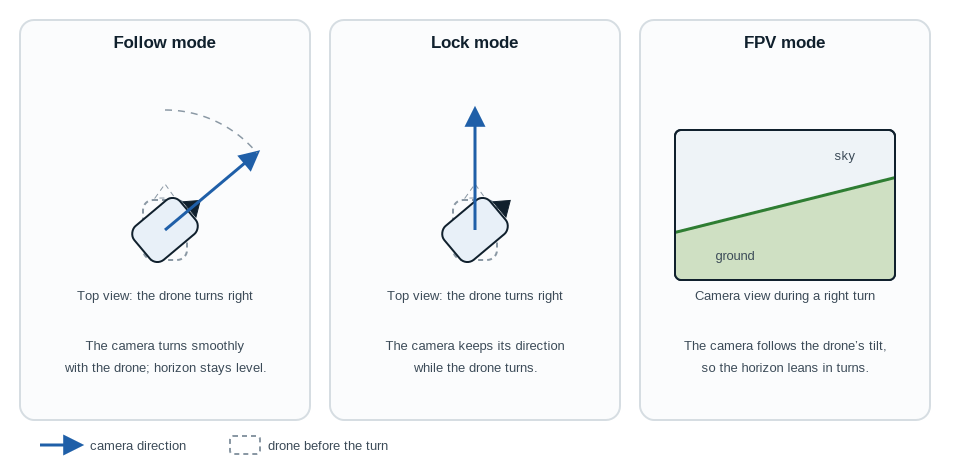
Gimbal modes change the relationship between the direction of the camera and the movement of the aircraft.
- Follow mode. The camera smoothly follows the drone as it changes heading, while the roll axis keeps the horizon level. Some follow modes also allow the camera to follow pitch. This produces gentle changes in the framing of aerial video.
- Lock mode. The camera holds a chosen viewing direction as the drone changes heading, within the gimbal's range of motion. The view does not have to turn with the nose of the drone.
- FPV mode. FPV stands for first-person view. The camera follows the tilt of the aircraft rather than trying to keep the horizon perfectly level. This gives aerial video a more immersive view of the aircraft's movement.
A tilted horizon in FPV mode is not necessarily a calibration problem. Follow mode and FPV mode are intended to give different looks to a shot.
How to set up and balance a gimbal
An integrated consumer camera gimbal is normally balanced at the factory. A removable camera gimbal needs to be balanced with the camera and its accessories fitted.
Step 1. Install the gimbal and vibration dampers. With the drone powered off, check that the mount is secure and the dampers are seated correctly. Make sure the camera has room to move without touching the frame or pulling on its cables.
Step 2. Check mechanical balance. Fit the camera and any lens filter you intend to use. On an adjustable gimbal, check the balance with the power off. Adjust the camera position on its mounting slide to balance its weight. A balanced camera should stay near the angle where you leave it instead of falling to one side. Recheck the balance when changing a lens or adding a filter.
Step 3. Remove the gimbal lock and start the self-check. Take off the protective clamp or cover before powering on the drone. Check for sand or other debris around the gimbal. Place the aircraft on a firm, level surface and leave it still while the gimbal completes its automatic startup movements.
Step 4. Perform gimbal calibration. Use the horizon adjustment or automatic gimbal calibration function on a level, stationary surface. This sets the level reference for the camera. IMU calibration, when needed, establishes the sensor reference for motion and gravity. Keep the drone still while the calibration runs.
Balancing is a mechanical process. Calibration establishes sensor references electronically. Calibration does not remove an obstruction or correct a camera that is mechanically out of balance.
Gimbal specifications explained
The mechanical range is how far an axis can physically rotate. The controllable range is the portion available for commanded camera movement, so the two figures are not necessarily the same.
| Parameter | Meaning | Typical range | Unit |
|---|---|---|---|
| Stabilization accuracy | Remaining angular movement while the gimbal stabilizes the camera | ±0.007 to ±0.02 on high-precision commercial gimbals | Degrees |
| Pitch controllable range | Available up and down camera angles | -90 to +35 or -120 to +30 | Degrees |
| Roll controllable range | Available sideways camera tilt | ±25 to ±47 on some models | Degrees |
| Yaw controllable range | Available left and right camera rotation | ±27 to ±60 on integrated units; ±300 or more, or continuous rotation, on many modular payloads | Degrees |
| Gimbal weight | Weight of the mount or integrated camera assembly | Under 300 g for consumer integrated units; about 500 g to 2.5 kg for commercial modular payloads | g or kg |
| Payload capacity | Maximum supported camera weight on an open gimbal | 200–500 g for lightweight mounts; 1–3 kg for mirrorless and DSLR-class mounts | g or kg |
| Operating voltage | DC input voltage supported by the gimbal | 11–25.2 for small and midsize units (3S–6S); up to 15–52 on some heavy units | V DC |
| Operating temperature | Supported ambient temperature | 0 to 40 for consumer units; -10 to 50 or -20 to 50 for many commercial payloads | °C |
| IP rating | Protection against dust and water | Often unrated on consumer gimbals; IP43 to IP55 on commercial payloads | IP code |
| Video output | How the camera sends its image to the video link or ground station | HDMI or micro-HDMI; Ethernet with an RTSP stream; SDI on some units | Interface |
Read the gimbal's IP rating separately from the aircraft's rating. A drone with a rated airframe does not necessarily have a camera gimbal with the same protection.
Single-sensor, dual-sensor and multi-sensor payloads
A payload is the equipment that the gimbal carries. A camera gimbal may have a single camera or house several imaging devices.
- Single-sensor payload. One imaging sensor, such as a visible-light camera used for mapping or aerial photography.
- Dual-sensor payload. Two sensors in one assembly, such as a visible-light camera and a thermal camera module. An inspector can compare the appearance of solar panels with their thermal images. The SIYI ZT6 Multi-Sensor Gimbal is a miniature optical and thermal imaging pod of this kind.
- Multi-sensor payload. Several sensors in one assembly, such as visible-light, zoom cameras and thermal imaging equipment for civil inspections.
Common mistakes
- The motors feel unusually hot or the image shakes. An unbalanced camera makes the motors work against the weight of the camera. Check balance with the power off, especially after fitting an accessory.
- Footage has a wavy, jelly-like appearance. Missing or hardened dampers can transmit vibration to the camera. Check for worn or damaged mounting parts before flight.
- The horizon leans even in follow mode. Movement or a sloping surface during calibration can affect the level reference. Calibrate with the aircraft resting on a firm, level surface.
- The camera jerks as it moves. A stiff or tight cable may pull on the mount. Check that the cables do not restrict the gimbal's movement.
- An overload warning appears when the drone starts. A forgotten transport clamp may block the gimbal's startup movement. Turn the drone off and remove the clamp before restarting it.
- The gimbal no longer moves normally after being pushed by hand. Forcing a powered gimbal can damage its electronics or cables. Only check the movement gently with the power off.
- The footage shakes during flight. A chipped or bent propeller can generate more vibration than the dampers can absorb. Check propellers for damage before flying.
Frequently asked questions
What is a gimbal on a drone?
A drone gimbal is a motorized mount that lets the camera rotate independently of the aircraft. It helps keep aerial footage steady and the camera at the desired viewing angle.
How does a drone gimbal stay level when the drone tilts?
Motion sensors measure the camera's movement, and a controller commands the gimbal motors to correct changes in its angle. This feedback loop continually checks the camera's orientation.
Can a drone fly without a gimbal?
Yes. A gimbal stabilizes the camera rather than the aircraft, so it is not required for flight.
Is a 3-axis gimbal better than a 2-axis gimbal?
A typical 2-axis drone gimbal stabilizes pitch and roll. A 3-axis gimbal adds yaw stabilization for smoother camera movement when the aircraft turns, but is usually heavier.
What is the difference between a gimbal and EIS?
A mechanical gimbal moves the camera itself, while electronic image stabilization (EIS) digitally adjusts the captured image. EIS often reduces the field of view through cropping.
What happens if you turn on a drone with the gimbal cover on?
A transport cover or clamp can block the gimbal's startup movement and cause a motor overload warning. Turn the drone off, remove the cover and restart it.
How do you calibrate a drone gimbal?
Place the drone on a firm, level surface and run its automatic gimbal calibration or horizon adjustment function. Leave the aircraft still until calibration finishes.
Why is my drone gimbal shaking?
Possible causes include damaged propellers, worn vibration dampers, an unbalanced camera or cables pulling on the gimbal. Inspect these parts before flying again.