What Is a Drone Dock (Drone-in-a-Box)?
A drone dock is a ground station that houses a drone and replenishes its battery between flights. A complete drone in a box system combines the station, a compatible aircraft and management software. Here is how a drone docking station works, what its main parts do and what to look for when choosing a system for your business.
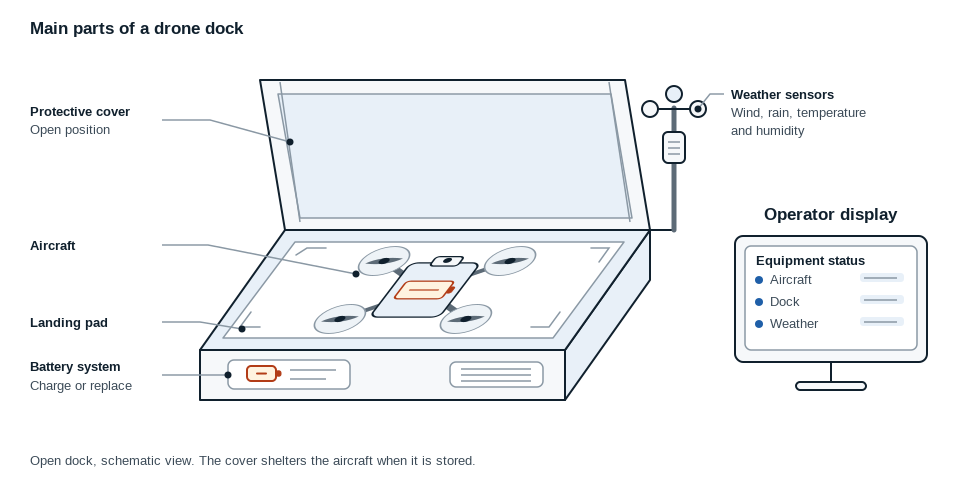
What a drone-in-a-box system includes
The terms drone docking station and drone-in-a-box are often used interchangeably. Strictly speaking, the dock is the physical enclosure on the ground. Drone-in-a-box describes the whole system, including the aircraft and the software used to manage it.
Instead of bringing a drone and its charging equipment to a work site for every job, a company can keep the equipment at the site. An automated drone station provides a dedicated home for the aircraft between jobs. It is part of the company's aviation equipment, not just a box for storing electronics.
The enclosure. A protected housing keeps out rain, dust and snow while the drone is inside. Motorized covers may slide open or lift up. When the aircraft is stored, the closed cover helps protect it from the outside environment.
The environment inside. Heating, cooling and moisture control may be built into the dock. These features serve different purposes. Temperature control keeps the electronics and batteries in a suitable environment. Moisture control helps prevent condensation, which can affect electronic parts, lenses and charging contacts.
The landing platform. Unlike an ordinary drone landing pad, a dock's landing platform is part of an enclosure and power system. Some models have mechanical guides or holding mechanisms that help keep the aircraft in place when docked.
The battery system. A drone battery supplies power to the aircraft. The dock may have a built-in drone battery charger or a battery exchange system. The enclosure also needs its own power supply for equipment such as the cover and climate control. Some models include backup power for essential functions. This is not the same as providing normal charging during a power outage.
The weather station and status sensors. A weather station may sit above the dock. Sensors measure conditions such as wind, rain, air temperature and humidity. Other sensors and a camera can help the operator see the condition of the enclosure. Some stations have an emergency stop button.
The management software. The software presents information about the aircraft and dock to the operator. It can also organize the images and flight records after a job. A local computing unit may be part of the system, while a network connection links the equipment to management software and business systems.
How a drone dock works
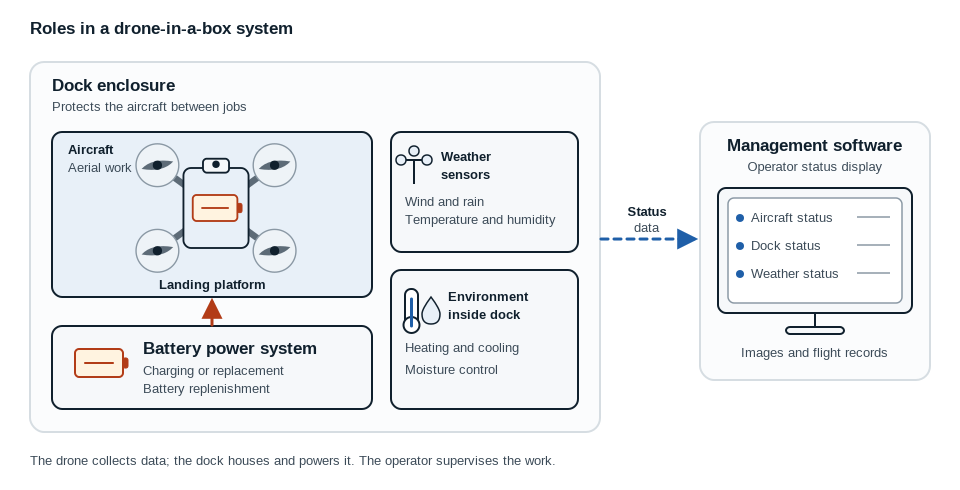
The dock protects the aircraft while it is not in use. The drone is the part that performs the aerial work. The software is the part that brings information about the equipment and the work together.
For example, inspection drones can be used to inspect solar panels and industrial equipment. Survey drones can collect images to document changes at a construction site. The equipment needed depends on the type of work.
A regular drone camera captures visible-light images. A thermal camera module or a LiDAR scanner represents a different type of data collection equipment. A dock is not itself a camera or a measuring instrument. The drone carries the appropriate equipment for the job.
Before-flight equipment and weather checks help determine whether a flight can take place. An automated system can delay a departure if conditions fall outside its approved limits. An operator is still responsible for supervising the work.
Automatic takeoff and landing are features of drone-in-a-box systems. The landing platform is designed to receive a compatible aircraft. Once the drone is inside the dock, the cover provides shelter again. Recorded imagery and flight records can be made available through the management software.
Automation does not remove the need for people. A business still needs someone to review the condition of the aircraft and station, make decisions about flight safety and use the information collected during the work.
Charging docks vs battery-swapping docks
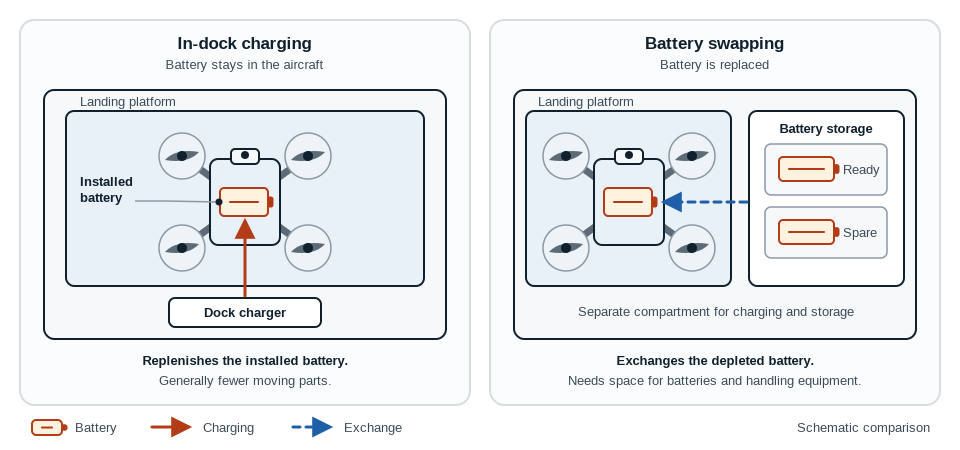
An in-dock charging system leaves the battery in the aircraft. A battery-swapping system exchanges a depleted battery for a charged one and stores batteries separately in the station for charging.
There are different types of in-dock charging. Contact-based charging uses a physical electrical connection. Inductive charging transfers power without charging contacts between the dock and aircraft. Avoiding a physical charging contact can reduce contact wear.
| Item | In-dock charging | Battery swapping |
|---|---|---|
| Battery location | Remains in the drone | Exchangeable batteries stored in the station |
| Power replenishment | Charges the installed battery | Replaces the installed battery |
| Mechanical parts | Generally fewer moving parts | Additional battery-handling mechanism |
| Size and weight | Generally more compact and lighter | Extra space and weight for batteries and equipment |
| Site power | Generally lower peak demand | May need more power for charging multiple batteries |
| Battery temperature | Installed battery may need cooling before charging | Removed batteries can cool in a separate compartment |
Battery temperature matters in both types. A battery can be hot after a flight. Charging it before it has cooled can contribute to battery aging. Some docks manage the battery temperature before charging.
When comparing the two designs, look at the equipment you will have to house and maintain. An exchange system includes more mechanical equipment than a typical charging system. A business also needs to manage the spare batteries stored in the station.
Sourcing drone docking stations for your business? Ask our team.
How to choose a drone dock for commercial use
Step 1. Define the job. Start with what your business wants to accomplish. For a solar installation, the requirement might be aerial images for equipment inspection. At a construction site, it might be pictures to compare progress over time. Decide who will review the images and what they need to receive.
Step 2. Check the system as a whole. Treat the aircraft, enclosure, battery system and management software as a package. Confirm that the aircraft and its data collection equipment are compatible with the dock. Do not judge the station simply by the size of its enclosure or the type of charger it contains.
Step 3. Review the site requirements. Identify the space available for the enclosure and access for maintenance. Consider local weather, flooding and dust exposure. Review the weight of the unit, the electrical requirements and the need for network access. Include the foundation and electrical protection in the site's infrastructure plan. A dock that fits in a floor plan is not necessarily suitable for outdoor operation at that site.
Step 4. Plan oversight and data handling. Check the applicable airspace and flight requirements before committing to a system. Flight beyond visual line of sight, or BVLOS, may require separate aviation approval. Decide who will be responsible for flight oversight. Include data access and the business systems that will receive the images and records in the purchasing decision.
Step 5. Plan maintenance before purchase. Find out which tasks belong to the site's maintenance team. Consider the time and access needed to check covers, seals, filters, weather sensors and drone propellers. Set aside responsibility for battery records as well as the physical condition of the equipment. An automated station still needs a maintenance schedule.
Common drone dock specifications
The specifications for the dock are not necessarily the same as those for the aircraft. Pay particular attention to the equipment that will remain outdoors at the work site.
| Parameter | Meaning | Common range | Unit |
|---|---|---|---|
| Enclosure IP rating | Rating for protection against dust and water | IP55–IP56 | IP code |
| Ambient operating temperature | Outside temperature range specified for the dock system | −25 to +45; −30 to +50 | °C |
| AC input voltage | Nominal AC supply supported by the dock | 100–240 | VAC |
| Maximum input power | Electrical demand including charging and temperature control | 800–2,000+ | W |
| Dock weight | Weight of the ground equipment, depending on design and base | 34–55 (lightweight); 100+ (heavier units) | kg |
The temperature column gives examples of specified ranges, not a single temperature range shared by all docks. The station may need time to adjust its internal temperature in very cold or hot conditions.
The IP rating describes the protection of the specified equipment. A rating for the drone does not tell you the rating of the dock. A weather-resistant enclosure also does not mean the aircraft is able to fly in every kind of weather.
When checking the power rating, remember that the station needs electricity for more than the aircraft battery. Heating and cooling the enclosure also use power.
Common mistakes
- Treating the dock as ordinary IT equipment. Outdoor aviation equipment has moving parts and surfaces that need attention. Dirt on optical surfaces, worn seals and mechanical problems can affect normal operation.
- Assuming every site has good positioning conditions. Nearby buildings and metal surfaces can reflect satellite signals. A clear-looking space is not a guarantee of good satellite reception.
- Ignoring electromagnetic interference. Large industrial electrical equipment can affect onboard sensors and communications. Make the site's suitability part of the purchasing review.
- Judging connectivity by the phone signal icon. A phone showing a signal does not establish whether a connection is suitable for exchanging images and equipment status information. Include network requirements in the site review.
- Overlooking moisture and electrical protection. Temperature changes can produce condensation inside equipment. Take enclosure condition, drainage, grounding and surge protection into account.
- Expecting the drone to need no human oversight. Unexpected weather or an equipment fault can affect a flight. Flight safety responsibilities and emergency arrangements belong in the operating plan.
- Buying the equipment before defining the work. A company may collect plenty of pictures but have no system for using them. Set the inspection or survey objectives, data requirements and aviation approval needs before ordering equipment.
Frequently asked questions
What is the difference between a drone dock and a drone-in-a-box?
A drone dock is the physical ground station that shelters the aircraft and replenishes its battery. Drone-in-a-box refers to the complete system, including the drone, dock and management software.
Can a drone-in-a-box operate without a pilot on-site?
Some systems support remotely supervised flights. Beyond-visual-line-of-sight flights may require aviation approval, and automation does not remove the need for flight oversight.
Can a drone dock be used in the rain?
Many dock enclosures are designed to resist water and dust. The dock can delay a flight in unsuitable weather, and the enclosure's weather rating is separate from the aircraft's flight limits.
Does a drone docking station charge the drone?
Many stations charge the battery while it remains in the aircraft. Other systems exchange batteries and charge removed batteries in the station.
What happens if a drone dock loses power?
Some docks have backup batteries to support essential functions during a power failure. Backup power does not necessarily support normal aircraft battery charging.
How often does a drone docking station need maintenance?
Maintenance can be scheduled according to flight hours, landings, battery cycles and calendar time. Typical maintenance items include cover mechanisms, seals, filters, sensors and aircraft propellers.
Can a drone dock use any drone?
A drone-in-a-box system uses an aircraft designed or adapted to work with the docking station. The station, aircraft, battery equipment and management software need to be compatible.