What Is an IMU? Gyroscope vs Accelerometer in Drones
What is an IMU sensor, and how does an IMU work in a drone? An inertial measurement unit senses movement and rotation, helping the aircraft stay balanced as it flies. Here is how it works, how a gyroscope and an accelerometer compare, and what to know about IMU specifications and calibration.
What an IMU is
An IMU sensor is a small electronic module containing motion sensors. Think of it as the drone's inner ear. Its readings help the aircraft tell when it is tilting, turning or accelerating.
The IMU measures motion. The flight controller uses those measurements to work out how the aircraft is moving and to help keep it stable.
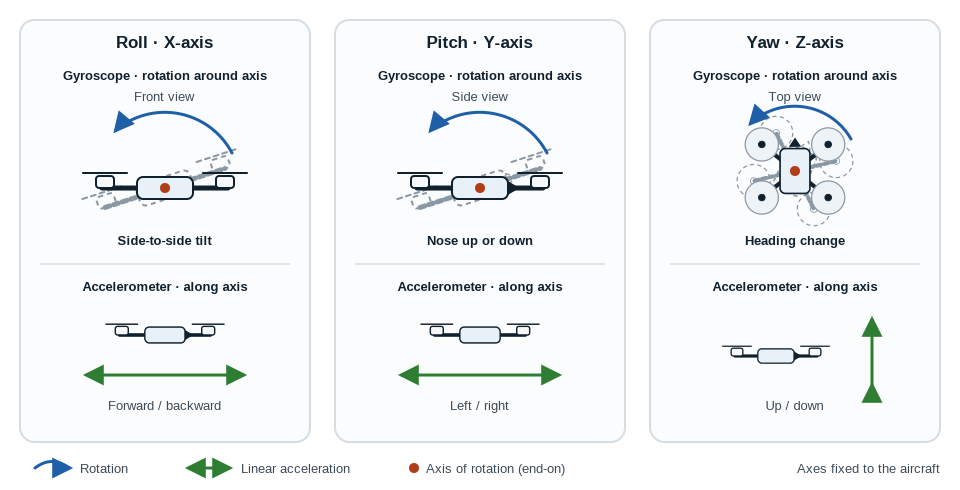
A typical IMU contains a three-axis accelerometer and a three-axis gyroscope. The sensors measure along or around the X, Y and Z axes. These axes are fixed relative to the aircraft.
- Roll. Rotation around the X-axis tilts the aircraft from side to side.
- Pitch. Rotation around the Y-axis moves the nose up or down.
- Yaw. Rotation around the Z-axis changes the direction in which the nose points.
Together, roll, pitch and yaw describe the drone's orientation, also called its attitude. An IMU does not directly measure attitude. The flight controller estimates it from sensor readings.
Gyroscope vs accelerometer vs magnetometer
These sensors measure different things. The gyroscope tracks rotation, the accelerometer senses changes in motion and provides a gravity reference, and the magnetometer acts as an electronic compass.
| Sensor | What it measures | Unit | Role in a drone | Main limitation |
|---|---|---|---|---|
| Gyroscope (gyro) | Angular speed around each axis | °/s | Detects fast changes in rotation | Estimated angles drift over time |
| Accelerometer (accel) | Specific force along each axis | g or m/s² | Helps estimate roll and pitch relative to gravity | Sensitive to vibration and aircraft acceleration |
| Magnetometer (mag) | Magnetic field strength and direction | μT or G (gauss) | Provides a magnetic heading reference | Sensitive to nearby metal and electrical interference |
Gyroscope. Imagine turning a drone by hand and then holding it still. The gyro senses the speed of the turn, not the final angle. The flight controller can estimate the change in angle by adding up rotation over time. Even a small error in the reading can accumulate, causing the estimated angle to drift.
Accelerometer. A stationary drone's accelerometer registers about 1 g (9.8 m/s²) in magnitude. When you tilt the aircraft, the reading changes across the axes. This helps the controller estimate which way is level. During flight, however, the readings also contain the effects of the aircraft's acceleration and mechanical vibration.
Magnetometer. Gravity can help establish roll and pitch, but it cannot tell the controller which direction the nose points on a level aircraft. A magnetometer gives it a reference to magnetic north. Metal objects and current flowing through power cables or electronic speed controllers (ESCs) can disturb that reference.
A 6-axis IMU combines the three gyro and three accelerometer axes. This arrangement is common in FPV drones. A 9-axis IMU adds a three-axis magnetometer. This gives the system a heading reference as well as a gravity reference. Some flight controllers use a separate compass instead of including it in the IMU module.
How MEMS sensors work
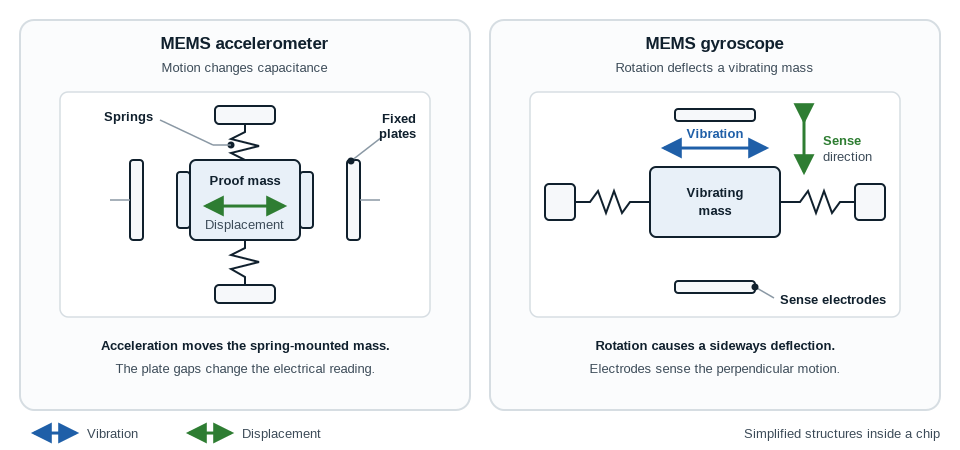
MEMS stands for micro-electromechanical systems. These sensors contain very small mechanical structures made from silicon. They sit inside a chip rather than using large moving parts.
In a MEMS accelerometer, a small mass hangs on tiny springs. When the sensor accelerates, the mass moves relative to the fixed structure. This changes the capacitance between the moving and fixed plates. Electronics convert the change into a measurement.
A MEMS gyroscope uses a vibrating mass rather than a spinning wheel. Rotation causes the vibrating structure to move sideways because of the Coriolis effect. Electrodes sense this small deflection and the chip reports the rate of rotation.
How the flight controller uses IMU data
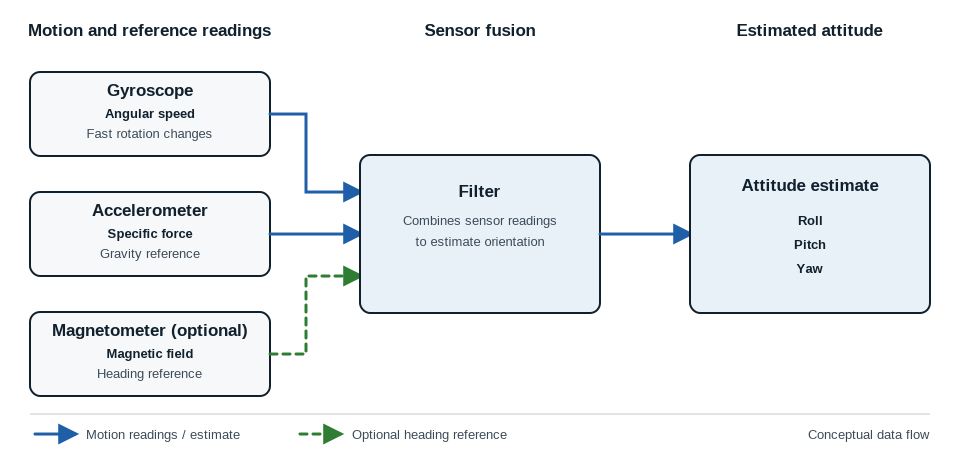
The controller needs to know the drone's attitude as well as how quickly that attitude is changing. Neither the gyro nor the accelerometer provides this information perfectly on its own.
Imagine a drone tilting forward. Gyro readings show the change in rotation as it tips. Accelerometer readings help establish where level is, especially when the aircraft is still. The gyro responds well to quick movements, but its angle estimate can drift over time. The accelerometer provides a long-term gravity reference, but sudden motion can confuse it.
Sensor fusion is the process of combining readings from different sensors to make a better estimate. It is similar to using several clues to judge what is happening, rather than relying on a single clue.
A complementary filter combines the gyro's quick response with the accelerometer's slower gravity reference. An extended Kalman filter, or EKF, predicts the aircraft's state and corrects that estimate using available measurements, taking sensor uncertainty into account.
The magnetometer can add heading information. Other measurements, such as those from a drone GPS and a barometer, help the controller estimate position, speed and altitude. Position hold needs more than an IMU alone.
Some controllers contain multiple IMUs for redundancy. They can compare the health of the sensor estimates and switch to a healthy source when they detect a problem. Simply averaging a faulty sensor with a healthy sensor is not the same as redundancy.
Sourcing IMU sensors or flight controllers for your business? Ask our team.
IMU specifications explained
An IMU specification sheet describes the sensor's measurement limits and the quality of its readings. Noise, bias and range describe different aspects of sensor performance.
Here are examples of figures found in consumer MEMS specifications. They are not universal values for every chip or flight controller.
| Specification | What it means | Example values or units |
|---|---|---|
| Gyroscope full-scale range (FSR) | The limit of the rotation rate the gyro can report | ±125, ±250, ±500, ±1,000 or ±2,000 °/s |
| Accelerometer full-scale range (FSR) | The limit of acceleration the sensor can report | ±2, ±4, ±8 or ±16 g |
| Output data rate (ODR) | How often the sensor supplies new readings | Example maximums: 1.6 kHz (accelerometer); 6.4 kHz (gyro) |
| Gyro noise density | Random fluctuations in rotation readings per unit of bandwidth | 0.0028–0.007 °/s/√Hz |
| Accelerometer noise density | Random fluctuations in acceleration readings per unit of bandwidth | 65–400 μg/√Hz |
| Zero-rate offset | The gyro reading when the sensor is not rotating | Examples of initial tolerance: ±0.5 to ±20 °/s |
| Zero-g offset | The reading error on an accelerometer axis with no applied specific force | Example initial offset: ±20 mg |
| In-run bias stability | How much the offset changes over time under stable temperature conditions | °/hr for gyro; μg for accelerometer |
| Angle random walk (ARW) | How random gyro noise accumulates into angle error over time | °/√hr |
| Bias temperature coefficient | How much the sensor's bias changes with temperature | °/s/°C for gyro |
Range. The full-scale range is not a measure of accuracy. If motion exceeds the range, the sensor cannot report its full magnitude. This is known as clipping.
Noise and bias. Picture a drone sitting on a desk. Its readings may vary slightly from moment to moment even though it is not moving. That variation is noise. Bias is an offset in a reading. A gyro with an initial offset may report a small rotation rate while sitting still. Bias stability describes how the offset itself changes with time, rather than its initial size.
Data rate. Hz means readings per second. The raw sensor output data rate and the flight controller's processing rate are not necessarily the same.
Vibration and IMU problems
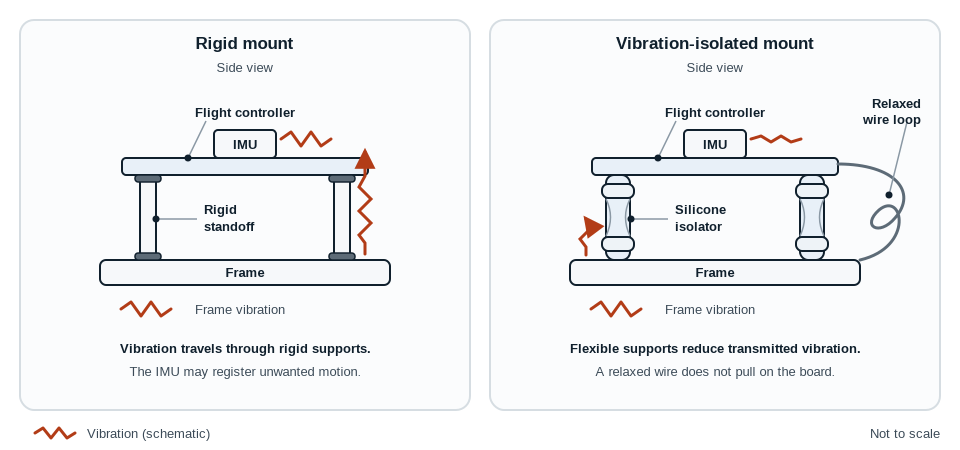
Spinning drone motors and propellers generate vibration. It can travel through the drone frame to the flight controller and its IMU.
The sensors cannot simply tell unwanted vibration apart from the aircraft's actual motion. The readings may become noisy. Strong vibration can even cause clipping, and rapid vibration can appear as slower motion in the sampled data. This is called aliasing. Both can affect the attitude estimate.
Signs of excessive vibration include shaking in flight, noisy sensor readings and difficulty holding altitude or position. A drone may also show wavy footage, sometimes called the jello effect. A successful calibration on a stationary desk does not rule out vibration during flight.
Vibration isolation. Some controllers use silicone mounts or foam pads to absorb vibration. The flexible material separates the controller from the frame. Damaged isolators or overly compressed rubber mounts may no longer provide effective isolation. Tight wiring can also carry vibration around the isolators.
Damaged propellers, loose motor screws and loose frame parts are other possible sources of vibration. Inspect the aircraft for wear or damage if you notice these symptoms.
If the flight controller makes sensor logs available, they can show whether accelerometer or gyro signals are noisy or clipped. Clipping is a warning that part of the measurement was lost. Calibration cannot recover missing measurements or correct a mechanical fault.
How to calibrate an IMU
IMU calibration helps establish correct sensor offsets and, for some systems, corrects the accelerometer's scale. Many drones automatically estimate gyro bias when they start up. A full accelerometer calibration is normally a separate procedure.
Step 1. Prepare the drone. Let the aircraft cool to room temperature if it has just been flown. Make sure the drone battery has sufficient charge. Find a firm, level surface where the aircraft will not be disturbed.
Step 2. Open the calibration screen. Find the IMU or accelerometer calibration function in the drone's app, flight controller configuration software or ground control station. The exact menu varies by system.
Step 3. Follow the on-screen positions. Some controllers only require the aircraft to sit level. Others use a 6-position calibration: level, left side down, right side down, nose down, nose up and upside down. Follow the order shown on the screen. Let the aircraft settle completely before the software takes each reading.
Step 4. Finish the calibration. Wait for the progress indicator to finish and the software to confirm completion. Restart the controller if prompted. Keep the aircraft still during any automatic gyro calibration on startup.
A compass calibration is a separate operation. It corrects errors in the magnetometer rather than in the gyro or accelerometer. The procedure may involve rotating the aircraft outdoors away from metal objects.
Common mistakes
- Confusing gyro readings with angles. A gyro measures rotation rate. An estimated angle can still drift even if the drone is sitting still.
- Calibrating on an uneven surface. An incorrect level reference can lead to tilt in flight. Start on a firm, level surface and do not touch the drone while it is taking readings.
- Repeating a full calibration before every flight. This is not normally needed. Recalibration may be useful after installation, a hard landing, a major firmware update or a calibration warning.
- Calibrating a hot aircraft. Temperature affects sensor bias. Let the aircraft cool before routine calibration and wait for any IMU warming-up message to clear before taking off.
- Ignoring damaged vibration isolators. Worn or compressed mounts and tight wiring can transmit movement to the controller.
- Overlooking propeller damage. A chipped or deformed propeller or a loose motor can cause vibration that calibration will not fix.
- Mistaking a compass problem for an IMU problem. A magnetometer can be affected by nearby cars or reinforced concrete. Repeating accelerometer calibration does not remove magnetic interference.
Frequently asked questions
What does an IMU do in a drone?
An inertial measurement unit (IMU) measures motion and rotation using an accelerometer and a gyroscope. The flight controller uses these readings to estimate the drone's attitude and help keep it stable.
What is the difference between a gyroscope and an accelerometer?
A gyroscope measures how fast the drone rotates, while an accelerometer senses specific force, including the effects of gravity and motion. The gyro responds to quick rotations, and the accelerometer helps the controller establish a level reference.
What is the difference between a 6-axis and a 9-axis IMU?
A 6-axis IMU contains a three-axis gyroscope and a three-axis accelerometer. A 9-axis IMU adds a three-axis magnetometer, which provides a magnetic heading reference.
Does an IMU need GPS to work?
No, the IMU measures motion and rotation without GPS. A flight controller can combine IMU readings with GPS and other measurements to estimate position and velocity.
Do I need to calibrate my drone IMU before every flight?
No, a full IMU calibration is not normally needed before every flight. Recalibration may be needed after installation, a hard landing, a major firmware update or a calibration warning.
Why does my drone say IMU warming up?
IMU sensor bias changes with temperature. The system may wait for its temperature to stabilize before allowing takeoff.
Can vibration cause IMU errors in drones?
Yes, vibration from motors, propellers or the frame can add noise to the sensor readings. Severe vibration can cause clipping or aliasing and affect the flight controller's motion estimate.
Is IMU calibration the same as compass calibration?
No, IMU calibration normally corrects gyroscope and accelerometer measurements. Compass calibration corrects magnetic field measurement errors in the magnetometer.