How Do Thermal Drone Cameras Work?
Thermal imaging creates pictures from the infrared radiation given off by objects rather than reflected visible light. So how do thermal cameras work on drones, and what can the colors on the screen tell you about temperature? Here is how thermal imaging works, what emissivity means and how thermal and other infrared cameras differ.
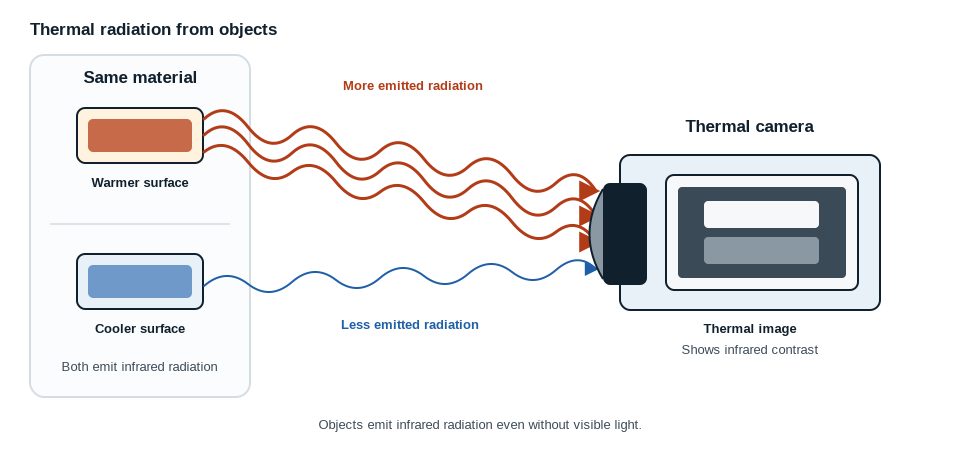
How thermal imaging works
Browse thermal camera drones and compare them with an ordinary aerial camera.
Objects above absolute zero emit thermal radiation. Even objects that feel cold emit infrared energy. In general, a hotter surface emits more thermal radiation than a cooler surface of the same material. The amount that reaches the camera also depends on the properties of the surface.
Infrared radiation is part of the electromagnetic spectrum. Its wavelengths are longer than those of visible light. You cannot see this radiation with your eyes, but a thermal camera can turn differences in infrared radiation into a visible picture, called a thermogram.
A warm patch on a roof may stand out from the material around it, but the image alone does not explain why it is warm.
Thermal vs infrared. Thermal imaging is a type of infrared imaging. The terms do not always mean the same thing when used to describe cameras.
- Visible light. A regular drone camera records reflected visible light. It shows the colors and physical details of the scene.
- Near-infrared (NIR). Some night vision cameras use reflected near-infrared light instead. An infrared illuminator supplies light when the surroundings are completely dark.
- Thermal infrared. A thermal camera senses infrared radiation emitted by surfaces. It works in daylight and darkness without an illuminator, but shows less physical detail than a regular camera.
Most commercial drone thermal cameras use long-wave infrared (LWIR). Mid-wave infrared (MWIR) is another band used in specialized equipment, such as cameras for industrial gas leak inspections.
Inside a thermal camera
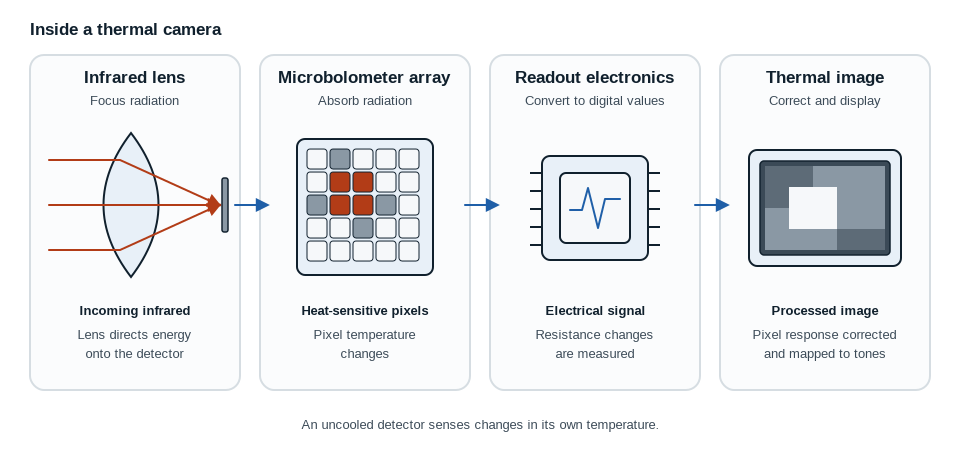
A typical thermal camera module contains an infrared lens, a detector and electronics that process the detector's signals. Most commercial drone thermal cameras use a detector called an uncooled microbolometer. It senses radiation through tiny changes in its own temperature.
Step 1. Focus the infrared radiation. The lens directs infrared radiation from the scene onto the detector. Ordinary glass blocks long-wave infrared radiation. Thermal lenses use materials such as germanium or chalcogenide glass that allow this radiation to pass through.
Step 2. Absorb the radiation. The detector contains a grid of heat-sensitive pixels, called a focal plane array. Each pixel has a suspended membrane that absorbs the incoming energy. Small supports reduce heat loss from the membrane to the rest of the chip.
Step 3. Convert heat into an electrical signal. The temperature of the membrane changes as it absorbs radiation. This changes the electrical resistance of a heat-sensitive material, such as vanadium oxide or amorphous silicon. A readout circuit measures the changes and converts the signals into digital values.
Step 4. Correct and display the image. The electronics correct differences in the response of individual pixels. The processed values are then displayed in a grayscale or color image. Radiometric cameras also use calibration data to estimate surface temperatures.
Uncooled means the detector does not need a cryogenic cooling system. This reduces the size and power consumption of the module, making it practical for drones.
A camera may sometimes make a clicking sound and briefly pause the image. During flat field correction (FFC), also known as non-uniformity correction (NUC), an internal shutter provides a uniform reference for the sensor. This helps correct image noise and changes in readings as the camera itself warms up.
What emissivity is and why it matters
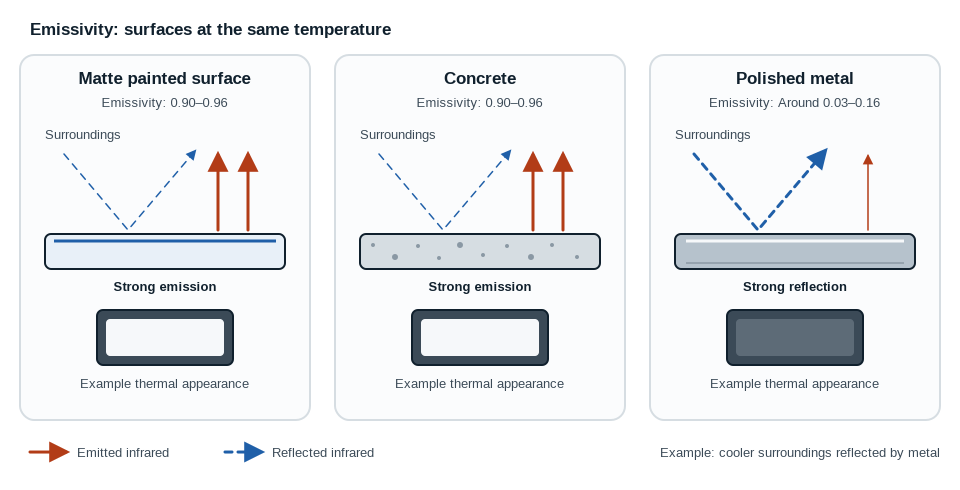
Emissivity is a measure of how effectively a surface emits thermal radiation compared with an ideal emitter, called a blackbody. It is expressed as a number from 0 to 1.
A surface with high emissivity gives off thermal radiation efficiently. A polished metal surface has much lower emissivity and can act like a mirror for infrared radiation from its surroundings.
| Surface | Approximate emissivity |
|---|---|
| Concrete, asphalt or non-metallic matte painted surfaces | 0.90–0.96 |
| Solar panel glass | 0.85–0.90 |
| Polished aluminum, copper or stainless steel | Around 0.03–0.16 |
Surface finish matters, too, so treat these as reference values.
A thermal camera does not receive only radiation emitted by the object. It also receives radiation reflected from the surroundings. For example, metal outdoors can reflect the cold sky and appear much colder than it actually is.
Reflected apparent temperature. This is the apparent temperature of the surroundings as reflected in the surface being measured. Along with emissivity, it is an important setting on a radiometric camera. An incorrect setting can lead to an incorrect temperature reading even if the image looks clear.
A radiometric camera estimates surface temperature, not the temperature inside a wall or a piece of equipment. Heat moving through the material may create a visible pattern on the outside.
Radiometric vs non-radiometric
Both types of camera show warmer and cooler areas. The difference is in the data available for measurement.
| Item | Radiometric | Non-radiometric |
|---|---|---|
| Image | Grayscale or color thermal picture | Grayscale or color thermal picture |
| Temperature data | Calibrated data for each pixel | Relative thermal contrast only |
| Saved files | Can retain temperature data | Picture without per-pixel temperature data |
| Analysis after flight | Measure points, areas and temperature differences | Examine patterns of warmer and cooler areas |
| Common uses | Solar, electrical and building inspections | Visual assessment of thermal patterns |
A radiometric JPEG, or R-JPEG, is an example of a file format that preserves thermal measurement data. Analysis software can use this data to find the maximum, minimum or average temperature in an area and adjust measurement parameters after a flight.
A screenshot of the same image does not preserve that data. If an inspection requires temperature measurements, save the original radiometric files as well as the pictures for your report.
Sourcing thermal camera payloads for your business? Ask our team.
Thermal camera specifications explained
Resolution tells you how much detail a thermal detector records. Thermal sensitivity tells you how small a difference in temperature it can distinguish. These are separate specifications.
| Specification | What it means | Examples |
|---|---|---|
| Thermal resolution | Number of physical detector pixels | 320 × 256 or 640 × 512 pixels |
| NETD | Noise equivalent temperature difference, a measure of thermal sensitivity | 30–50 mK for common uncooled vanadium oxide detectors |
| Waveband | Range of infrared wavelengths sensed by the detector | LWIR for general inspections; MWIR (3–5 μm) for specialized gas imaging |
| Frame rate | Number of image updates per second | 30, 50 or 60 Hz |
| Field of view (FOV) | Angle of the scene covered by the lens | Around 33–50° horizontally for common lenses |
NETD. A lower number means greater sensitivity to small temperature differences under comparable test conditions. It does not mean that the reported temperature is accurate to the same value. Measurement accuracy also depends on calibration and the settings used for the surface.
Resolution and field of view. A wider field of view covers a larger area. A narrower field of view shows a smaller area in more detail if the sensor resolution and distance remain the same.
Distance matters as well. A small hot part may occupy only a fraction of a pixel in the image. That pixel then contains radiation from both the part and its surroundings, so the temperature of the part may be underestimated. Digital zoom makes the image larger but adds no new thermal measurements. Read more about ground sample distance, or GSD.
Color palettes
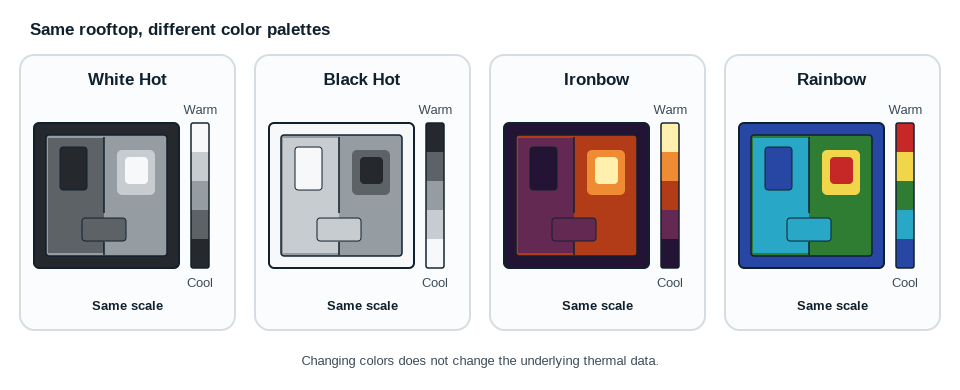
The camera or analysis software assigns the colors in a thermogram.
- White Hot. Warmer areas appear lighter and cooler areas darker.
- Black Hot. Warmer areas appear darker and cooler areas lighter.
- Ironbow. The scale goes from dark tones through red and yellow to bright tones. It is widely used for industrial inspections.
- Rainbow. Several contrasting colors highlight differences, but small temperature changes can look more significant than they are.
The temperature scale next to the image shows what each color represents. Span is the width of the temperature interval displayed. Level is the center of that interval.
Automatic scaling can change the appearance of a scene when a warmer or cooler object enters the picture. Keeping the level and span fixed makes it easier to compare images of the same installation. Changing the palette does not change the underlying thermal data.
Where thermal drones are used
Thermal inspection drones help maintenance teams find temperature differences across structures and equipment.
- Solar panels. Thermal images show unusual heating in photovoltaic (PV) modules while the panels are generating power.
- Electrical equipment. Industrial drones can help document unusual heating in electrical connections and compare similar components under load.
- Buildings and roofs. Survey drones can collect images for maps of surface temperature differences related to insulation or moisture problems.
- Search and rescue. Search and rescue drones give emergency teams thermal images to help assess an area.
- Firefighting. Firefighting drones help fire crews assess the extent of heated areas during an incident.
- Agriculture. Agricultural drones equipped with thermal cameras can use the same imaging principle to compare surface temperatures of soil and vegetation.
For commercial inspections, compare the thermal images with visible-light photos. Dirt, shadows and leaves can affect the appearance of the scene. A thermal map records where temperature differences occur, but the regular photos help put those differences in context.
Common mistakes
- Leaving emissivity at its default value. Set emissivity and reflected apparent temperature for the surface being measured instead of using the same values for every material.
- Trusting a bright or dark spot on shiny metal. A reflection from the surroundings can create a false temperature indication. Compare similar components and look for changes in the pattern with the viewing angle.
- Overlooking sunlight. Reflected sunlight and uneven solar heating can create misleading hot areas on panels, roofs or equipment.
- Relying on digital zoom. Enlarging the picture does not give a small component more detector pixels or improve its temperature measurement.
- Saving only screenshots. Keep the original radiometric files when measured temperatures are needed for analysis.
- Trying to measure through windows. Ordinary window glass blocks the long-wave infrared radiation used by most thermal cameras. The picture shows radiation from the glass and its reflections, not the temperature of objects behind it.
- Comparing images with different color scales. Check the scale and use consistent level and span settings when comparing the same surfaces across images.
- Confusing a temperature difference with a confirmed defect. Compare the thermal pattern with regular photos and the condition of the equipment before drawing a conclusion.
Frequently asked questions
What is thermal imaging and how does it work?
Thermal imaging converts infrared radiation into a picture of warmer and cooler areas. A thermal camera uses a detector to sense radiation from surfaces and electronics to turn those signals into an image.
What is the difference between thermal and infrared cameras?
Thermal cameras are a type of infrared camera. Unlike near-infrared night vision cameras that detect reflected light, thermal cameras sense radiation emitted by objects and do not need an illuminator.
What is emissivity in a thermal camera?
Emissivity describes how efficiently a surface emits thermal radiation compared with a blackbody. Choosing the wrong emissivity setting can lead to incorrect temperature readings, especially on reflective surfaces.
Do thermal drone cameras work during the day?
Yes. Thermal cameras work in daylight and darkness, but sunlight can heat surfaces unevenly and change the temperature patterns in the image.
Can a thermal camera see through walls or glass?
Drone thermal cameras using long-wave infrared cannot see through ordinary walls or windows. They record radiation from the surface, including any reflections.
Why does my thermal camera click and briefly freeze?
Some cameras use an internal shutter to provide a uniform reference for the detector during flat field correction. The click and brief pause occur while the camera corrects differences in pixel response.
Can all thermal cameras measure temperature?
Non-radiometric cameras show relative thermal contrast without storing a measurement for each pixel. Radiometric cameras can save calibrated data for temperature analysis.