Drone Camera Shutters: Mechanical vs Electronic, Rolling vs Global
The mechanical vs electronic shutter comparison is about how a drone camera controls exposure. The rolling vs global shutter comparison is about when different parts of the image are exposed. Here is how these shutter types work, why a rolling shutter drone can produce distorted images, and what to look for when choosing a camera for aerial photography or mapping.
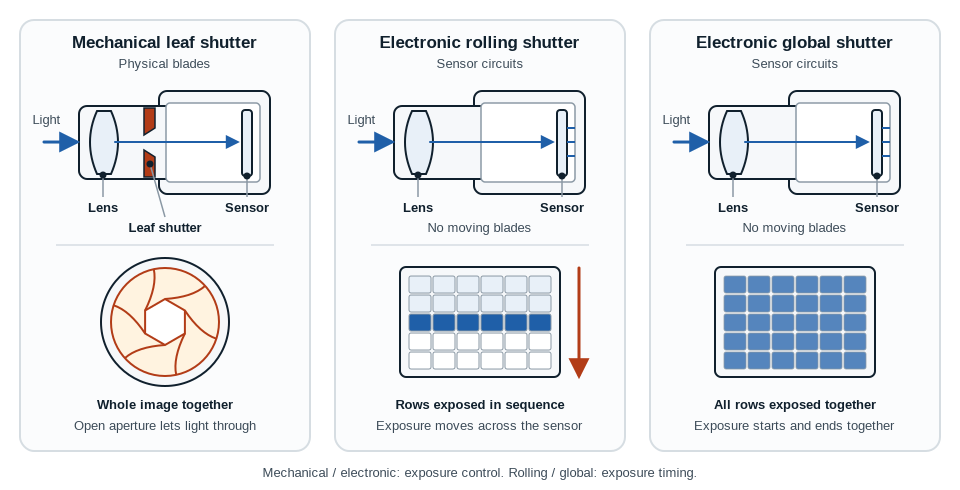
Mechanical vs electronic shutter
Shutters on drone cameras control how long the image sensor collects light to create a picture. That length of time is called the exposure time, often expressed as the shutter speed.
Mechanical shutter. A physical set of blades or curtains opens and closes to control the light reaching the sensor. There are different mechanical designs.
- Leaf shutter. Overlapping blades inside the lens open from the center and close again. Light reaches the whole image area together. Cameras on professional survey drones commonly use this design.
- Focal-plane shutter. A front curtain and a rear curtain move across the sensor. At fast shutter speeds, the gap between the curtains becomes a narrow moving slit. Different parts of the frame can then be exposed at slightly different times.
- Electronic front-curtain shutter (EFCS). This hybrid system starts exposure electronically and ends it with a mechanical rear curtain. It reduces vibration caused by the movement of the front curtain.
Electronic shutter. Circuits inside the CMOS image sensor start and stop light collection by the pixels. There is no mechanical shutter movement, so the process is quiet and does not create shutter shock.
Many aerial photo drones use electronic rolling shutters. Electronic global shutters are also available in specialized machine vision sensors. Look for this distinction when comparing cameras for industrial drones.
Do not assume that mechanical always means global or that electronic always means rolling. The mechanism that controls exposure and the timing of exposure across the image are separate features.
Rolling vs global shutter: How the sensor works
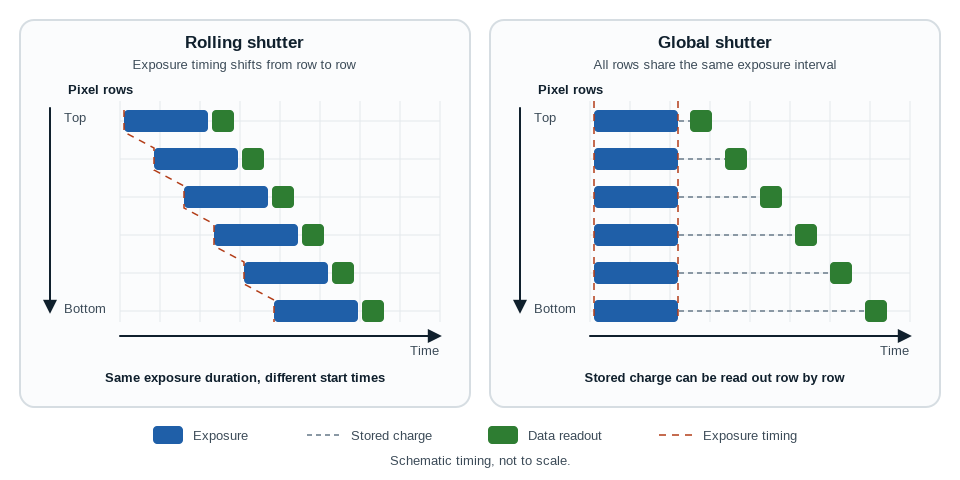
Think of an image sensor as a grid of pixels arranged in rows. The shutter controls when each row starts collecting light and when it stops.
Rolling shutter. The sensor resets, exposes and reads out its pixels row by row, often from top to bottom. Each row can have the same exposure duration, but the bottom of the frame is captured later than the top.
The time difference across the frame is called the rolling shutter readout time. Small delays between individual rows add up to a much longer delay across the whole image.
Global shutter. All pixels start and finish their exposure together. In an electronic global shutter, the sensor transfers the captured charge to storage within the pixels. The camera can read out the stored information row by row afterward without changing the exposure timing.
A global shutter does not have instantaneous data readout. What matters is that the light was collected over the same time interval across the image.
A rolling shutter is not necessarily a problem in a still scene. The difference becomes visible when an object or the camera moves during the capture of a frame.
Why rolling shutter causes distortion on a drone
A drone can move or rotate while the sensor scans the image. A drone gimbal can provide a steady viewing angle, but rapid camera movement or vibration during a frame can still cause a rolling shutter effect.
Here are some of the signs:
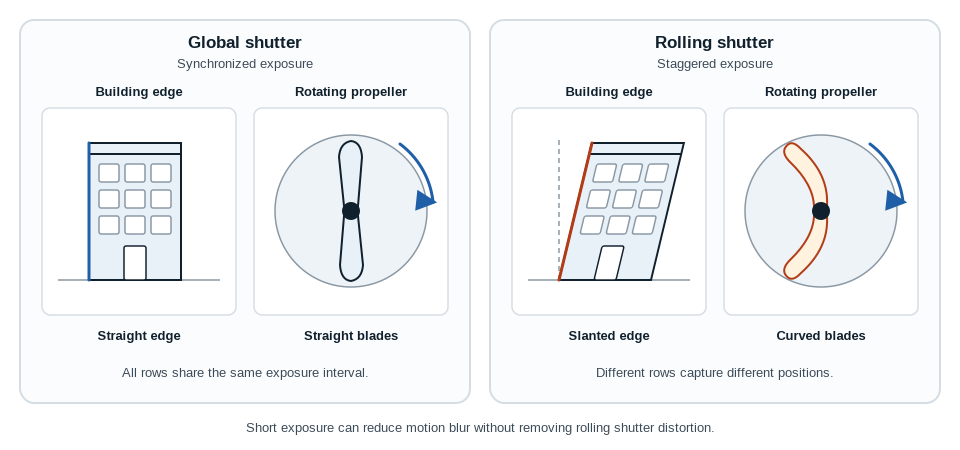
- Skew. Straight vertical features, such as building edges or poles, appear tilted during lateral movement.
- Jello effect. Vibration makes the image appear to bend or wobble.
- Distorted moving objects. A rotating drone propeller can appear curved even though its blades are straight.
- Banding. Flickering LED or fluorescent lights can produce horizontal light and dark stripes because the rows capture different parts of the lighting cycle.
Motion blur is different. Blur occurs when the image moves across a pixel during its exposure. Rolling shutter distortion comes from the time difference between pixel rows.
For example, a picture of a building may have crisp edges that appear slanted. Shortening the exposure can make the edges sharper without correcting their shape. A faster shutter speed does not necessarily mean a faster sensor readout.
Why it matters for mapping. Photogrammetry uses common features in overlapping images to calculate the shape and position of objects. Conventional calculations treat the entire photo as a view from a single camera position. With a rolling shutter, the upper and lower portions of the image may actually come from different camera positions.
Uncorrected distortion can contribute to misaligned seams in an orthomosaic, warped building faces or a curved surface in a model of flat ground. Height and stockpile volume measurements can be affected too. See the guide to drone mapping outputs for the differences between these outputs.
A leaf shutter or electronic global shutter avoids the sequential exposure of a standard rolling sensor. It does not, however, prevent blur from movement during the exposure itself.
Shutter types compared
| Item | Mechanical leaf shutter | Electronic rolling shutter | Electronic global shutter |
|---|---|---|---|
| Exposure control | Physical blades | Sensor circuits | Sensor circuits |
| Exposure timing | Whole image exposed together | Staggered pixel rows | Synchronized pixel exposure |
| Rolling shutter distortion | Avoids row-by-row exposure distortion | Possible when the scene moves | Avoids row-by-row exposure distortion |
| Shutter shock | Mechanical vibration possible | None from the shutter | None from the shutter |
| Wear | Moving parts can wear | No mechanical shutter wear | No mechanical shutter wear |
| Common use | Professional mapping photography | General aerial photos and video | Motion-sensitive industrial imaging |
A focal-plane mechanical shutter is not included in the leaf shutter column. Its moving slit can produce a timing difference across the image at fast shutter speeds.
For scenic photos taken while hovering, an electronic rolling shutter may be quite suitable. The absence of shutter shock and mechanical wear can be useful.
For mapping work, a leaf or global shutter is generally preferable when the geometry of the image is important. This applies to cameras carried by multirotors as well as by fixed-wing drones and VTOL drones. A rolling shutter camera can also be used with specialized correction in the mapping software. Its suitability depends on the project and the quality of the resulting map.
Choosing drone cameras for your mapping or aerial photography business? Ask our team.
How to choose and use a drone camera shutter
Step 1. Decide what the images are for. A scenic photo and a photo intended for measurements have different requirements. For a landscape photo, the visual appearance may be the priority. For construction mapping, image geometry matters as well as sharpness.
Step 2. Identify the actual shutter design. Check whether the camera uses a leaf shutter, a focal-plane shutter or an electronic shutter. If it uses an electronic shutter, check whether exposure is rolling or global. A camera that lists a very short exposure time does not necessarily capture an entire image at once.
If the camera offers a mechanical leaf shutter mode and an electronic rolling mode, select the leaf shutter for mapping rather than assuming it is already active.
Step 3. Set exposure and focus. For daylight mapping photos, 1/1000 s is a common exposure time. Use the camera's manual exposure settings to keep exposure and white balance consistent between photos when lighting is stable.
Take a test photo and check the focus. An autofocus lock can keep the camera from searching for focus again over areas with little visible texture.
Step 4. Separate photo and video settings. A neutral-density (ND) filter reduces the amount of light entering the lens. It is often used to give moving objects a natural amount of blur in aerial video. Mapping photos need sharp details instead. Removing the video ND filter makes it easier to use a short exposure without raising ISO unnecessarily.
Step 5. Review the image, not just the settings. Look at a test photo at full size. Pay attention to sharpness, the shape of straight objects and any horizontal stripes. A blurred edge and a sharply defined but bent edge point to different problems.
If the photos were taken with an electronic rolling shutter, check whether the mapping software supports rolling shutter correction. Do not treat correction as a guarantee that every image will be suitable for measurements.
Common shutter parameters
The table shows typical values rather than fixed specifications for all drone cameras. Exposure duration and readout time are different specifications, even though both describe time.
| Parameter | Meaning | Typical range | Unit |
|---|---|---|---|
| Mapping shutter speed | Exposure duration commonly used for daylight mapping photos | 1/500–1/2000 | s |
| Maximum focal-plane shutter speed | Fastest exposure setting on many conventional mechanical curtain shutters | 1/4000–1/8000 | s |
| Maximum electronic shutter speed | Fastest available electronic exposure setting | 1/8000–1/32000 or faster | s |
| Standard CMOS rolling readout time | Time for the scan to progress across the frame on a non-stacked sensor in full-resolution still photo mode | 15–60 (up to about 100 on some sensors) | ms |
| Stacked CMOS rolling readout time | Frame scan time on a sensor with stacked high-speed circuitry | 2–10 | ms |
| Global shutter exposure skew | Exposure timing difference between the top and bottom pixel rows | 0 | ms |
| Row readout interval | Delay between the start of readout of adjacent rows on a rolling shutter sensor | Approximately 1–30 | µs |
| Focal-plane curtain transit time | Time for a mechanical curtain to travel across the sensor | 2–5 (8–15 for some medium-format or older cloth-curtain shutters) | ms |
The maximum shutter speeds for conventional camera designs are examples, not ratings for every drone camera. Stacked CMOS sensors with rolling shutters can have shorter frame readout times than standard CMOS sensors. They still expose rows at different times.
The zero in the global shutter row refers to the exposure timing difference. It does not mean that the camera has no readout or processing time.
Common mistakes
- Leaving exposure fully automatic for a series of mapping photos. Changes in shutter speed and ISO can cause neighboring photos to have different brightness levels. This can make features harder to match and introduce visible seams in the finished map. Use consistent exposure and white balance in stable light.
- Confusing a sharp photo with an undistorted photo. A short exposure reduces motion blur but does not necessarily change the time gap between rows of a rolling shutter. Look at the shape of building edges as well as the detail along them.
- Keeping the video ND filter on for mapping. Reduced light can lead to a slower shutter speed or higher ISO. Remove the video filter when switching to mapping photos that need clear ground detail.
- Assuming that any mechanical shutter is a global shutter. A focal-plane curtain shutter can expose parts of the image in sequence. Check for a leaf shutter or electronic global shutter if synchronized exposure is important.
- Confusing the shutter speed with the photo interval. The shutter speed tells you how long a photo is exposed. The minimum trigger interval depends on how quickly the camera can finish its capture cycle and store images. A short exposure alone does not prevent skipped photos.
- Leaving continuous autofocus to search between mapping photos. Smooth pavement, water or uniform areas of vegetation can cause the camera to hunt for focus. Check the focus on a test image and lock it before a photo series.
- Overlooking noise and bands in electronic shutter photos. Raising ISO excessively can introduce noise, while flickering artificial light can create horizontal stripes with a rolling shutter. Check the exposure and look for bands under the lighting you intend to use.
Frequently asked questions
What is the difference between a mechanical and an electronic shutter on a drone?
A mechanical shutter uses physical blades or curtains to control light. An electronic shutter controls exposure using circuits in the image sensor, with no moving shutter parts.
What is the difference between a rolling shutter and a global shutter?
A rolling shutter exposes pixel rows at slightly different times. A global shutter exposes all pixels at the same time, even if the data is read out later.
Is a mechanical shutter the same as a global shutter?
Not always. A mechanical leaf shutter exposes the whole image area together, but a focal-plane shutter can expose it in strips at fast shutter speeds.
Can you use a rolling shutter drone for mapping?
Yes, some mapping software supports rolling shutter correction. For projects that depend on accurate image geometry, a leaf shutter or global shutter is generally a better choice.
Does a faster shutter speed fix the rolling shutter effect?
No. A short exposure can reduce motion blur, but rolling shutter distortion can remain if the time difference between pixel rows does not change.
What shutter speed is best for drone mapping?
An exposure time of 1/1000 s is a common starting point in daylight. The appropriate setting depends on light levels and the amount of movement during exposure.
Does using an electronic shutter wear out a drone camera shutter?
An electronic shutter has no moving shutter parts, so it does not cause mechanical shutter wear. Rolling shutter distortion and banding under flickering lights are possible image quality issues.