ChinaDroneRequest a quote →

Xingkai 6.1-7.2GHz 5W FPV Video Transmitter (VTX)

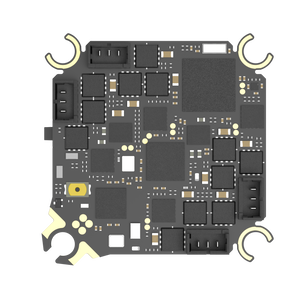
The Xingkai 6.1-7.2GHz 5W FPV Video Transmitter (VTX) combines 64 channels, five selectable power levels and Smart audio OSD configuration. Built with an integrated cooling fan and MMCX antenna connection, the 24.5g transmitter is supplied with a cable and pigtail.

XingkaiFPV drone parts
Channels
64 channels
Input Voltage
12 V to 28 V
Weight
24.5 g
Dimensions
36 (W)x36 (L) mm, 30.5 x 30.5 mm (hole)

Get a free quote

Product overview

The Xingkai 6.1-7.2GHz 5W FPV Video Transmitter (VTX) provides FPV video transmission with 64 channels and five switchable output levels: 1W, 2W, 3W, 4W and 5W. Smart audio supports OSD configuration, while a button provides local selection: holding it selects a function with a corresponding green indicator, and a brief press selects a gear with a corresponding blue indicator. A built-in fan provides cooling. The transmitter does not support a microphone.

The transmitter measures 36 mm wide by 36 mm long, with a 30.5 x 30.5mm hole pattern, and weighs 24.5g. It uses an MMCX antenna connector and a JST 6pin cable connector with a single 12–28V input and single ground. Input voltage is 12V to 28V, with a 6S battery suggested. The camera power supply is 5V at under 500mA maximum. The kit includes one VTX, one cable and one pigtail.
Links & controllers

Specifications

6.1-7.2GHz 5W FPV Video Transmitter (VTX) specifications
SpecificationValue & conditions
ProductXingkai 6.1-7.2GHz 5W FPV Video Transmitter (VTX)
Input Voltage12V to 28V6S battery suggested.
Extra FeaturesSmart audio 5000mW
Power Supply5V Camera @ under 500mA maxFor camera power supply.
Output Power1W/2W/3W/4W/5WSwitchable power levels.
MicrophoneNot supported
Antenna ConnectorMMCX
Cable ConnectorJST 6pinSingle 12-28V input and single ground.
Dimensions36 (W)x36 (L) mm, 30.5 x 30.5mm (hole)
Weight24.5g
Kit Contents1x VTX, 1x cable, 1x pigtail
CoolingBuilt-in cooling fan
OSD ConfigurationOSD configurationVia Smart audio.
Channels64 channels
Function SelectionSelects a function and illuminates the corresponding green indicatorPress and hold the button.
Gear SelectionSelects a gear and illuminates the corresponding blue indicatorPress the button briefly.

Related guides