Product overview
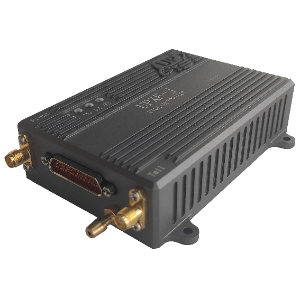
The ZeroOne Flight OneGNSS M9N serves as a flight-controller peripheral for satellite positioning, compass input and configurable barometer operation. Its hardware interface includes a CAN port, with the recommended connection running through a CAN/I2C cable to the controller’s CAN1/2 interface. An integrated compass appears to ArduPilot as an external UAVCAN compass and normally receives primary priority. A safety button and indicator provide motor-output control and status, while an omnidirectional RGB light follows flight-controller indications when configured for DroneCAN.
Integration supports ArduPilot and PX4 through their respective CAN settings. PX4 operation requires a memory card in the flight controller. Internal settings cover barometer and compass enablement, node identification, CAN bitrate, GPS update interval and satellite-system selection; the default GPS interval is 200 ms. Extended configuration over MAVLink requires ground station version 1.3.81 or later and ardu firmware 4.3 or later, with CAN SLCAN access required for earlier versions. Parameter changes require writing the settings and power-cycling the unit.
Specifications
| Specification | Value & conditions |
|---|---|
| Recommended connection | Connect the OneGNSS M9N CAN port to the flight controller CAN1/2 interface using a CAN/I2C cable. |
| CAN bus enable settings | CAN_P1_DRIVER = 1 enables CAN1; CAN_P2_DRIVER = 1 enables CAN2.ArduPilot configuration. |
| Primary GPS communication | GPS1_TYPE = 9 selects DroneCAN. A change from no GPS to no fix indicates normal CAN communication.ArduPilot configuration. |
| Integrated compass | The integrated compass is automatically recognized as an external UAVCAN compass; it should normally be assigned first priority as the primary compass.ArduPilot configuration. |
| Safety button operation | Hold the button for 3 seconds to enable or disable motor and servo outputs; long-press motor-output control remains available when the safety switch is disabled by configuration.Including when brd_safety_deflt disables the safety switch at startup. |
| Safety indicator | Flashing indicates the safe state with no motor signal output; steady illumination indicates enabled motor and servo outputs. |
| Omnidirectional RGB indicator | Set NTF_LED_TYPES to 123111 and include DroneCAN to drive the omnidirectional RGB light; its flashing colors match the flight controller status light.ArduPilot configuration. |
| Secondary GPS communication | GPS_TYPE2 = 9 selects DroneCAN for GPS2.Using two CAN GPS units with ArduPilot. |
| CAN virtual driver protocols | CAN_D1_PROTOCOL and CAN_D2_PROTOCOL default to 1, selecting DroneCAN for the CAN1 and CAN2 virtual drivers.ArduPilot configuration. |
| Buzzer setting | NTF_BUZZ_TYPES defaults to 5; setting it to 1 disables the buzzer.ArduPilot configuration. |
| Status light brightness | NTF_LED_BRIGHT defaults to 3; setting it to 0 turns off the side indicator.ArduPilot configuration. |
| Disable safety switch | Set BRD_SAFETY_DEFLT to 0.ArduPilot configuration. |
| PX4 integration settings | Set UAVCAN_ENABLE to Sensors Automatic config; UAVCAN_SUB_GPS defaults to enable. Restart the flight controller after configuration.PX4 configuration through QGroundControl; the flight controller requires a memory card. |
| Extended configuration requirements | MAVLink access requires ground station version 1.3.81 or later and ardu firmware 4.3 or later. Earlier versions require the CAN SLCAN port. The flight controller can connect to the ground station through Type-C or telemetry.OneGNSS connected to the flight controller with normal communication. |
| Device identification | Device name: org.ardupilot.ZeroOne_GNSS. Select MAVLink-CAN1 again if the device does not appear.DroneCAN/UAVCAN device discovery through MAVLink-CAN1. |
| Barometer configuration | BARO_ENABLE defaults to 1, enabling the barometer; 0 disables it. |
| CAN node ID | CAN_NODE defaults to 0 for automatic UAVCAN device ID assignment by the flight controller; adjustable range: 0–255. |
| Compass configuration | Compass_enable defaults to 1, enabling the compass; 0 disables it. |
| CAN communication bitrate | CAN_BAUDRATE defaults to 1000000. |
| GPS update interval | GPS1_RATE_MS defaults to 200 ms. |
| Satellite system selection | Selection values: GPS = 1; SBAS = 2; Galileo = 4; BeiDou = 8; IMES = 16; QZSS = 32; GLONASS = 64. GPS only = 1; BeiDou + GLONASS = 72.GPS1_GNSS_MODE configuration. |
| Applying internal configuration | Write the parameters and power-cycle the unit to complete configuration.After modifying internal parameters. |
| Firmware update method | Select Menu, then update; choose No in the prompt, select a downloaded local firmware file, and wait for the update to complete.OneGNSS visible through MAVLink-CAN1 in the DroneCAN/UAVCAN interface. |
Request a quote for OneGNSS M9N
Send your application, destination country and expected quantity to the ChinaDrone team. We can discuss product selection, configuration and sourcing from China.
Submit your procurement requirements ↗No account needed. A model number is optional. Your enquiry is handled by ChinaDrone.